Case study · 2026
Jess Drawing World
We built a polished, kid-safe drawing app — markerless AR tracing, on-device CV, encrypted local storage — for a real child, AI-accelerated and cost-disciplined.
A local-first, privacy-first Flutter app that teaches a child to draw — guided lessons, camera-anchored AR tracing, and on-device image processing, all offline with no accounts and no cloud.
- Industry
- Capability build · Kids' EdTech
- Engagement
- AI-accelerated build with Claude Code
- Result
- We built a polished, kid-safe drawing app — markerless AR tracing, on-device CV, encrypted local storage — for a real child, AI-accelerated and cost-disciplined.
The challenge
Teaching a young child to draw is a real, specific problem: kids learn by tracing and by following small steps, then need encouragement to keep going. Off-the-shelf kids' apps tend to solve this with ads, accounts, leaderboards, and cloud sync — exactly the things a parent does not want pointed at their child. The brief was to build something genuinely useful for one real kid, Jess, that a parent could hand over without worrying about who is collecting what.
That meant taking privacy as a hard constraint, not a marketing line. No account to create, no ads to serve, no analytics backend phoning home, and nothing uploaded to anyone's cloud. But the features parents actually want — turning a photo into a line drawing, a 'how close did I get?' accuracy score, read-aloud for pre-readers, daily reminders — are usually the exact features that lean on paid cloud APIs. Doing them with zero cloud and zero per-call cost is a much harder engineering problem.
On top of that, the most engaging feature — anchoring a reference image onto a real sheet of paper through the camera so a child can trace it by hand — is markerless AR. There is no off-the-shelf Flutter plugin that does this well, and ARCore is a native, low-level surface. The build had to reach down into Kotlin, raw ARCore and GLES2, and still come back up into a single, tidy Flutter app that ships to a real Pixel device — without a sprawling budget or timeline.
What we built
We built it as one Flutter codebase (Dart, Riverpod 2.x code-gen state, go_router navigation) targeting Android first, with iOS configured and a Web build behind it. That single codebase carries 250 step-by-step lessons (~1,000 steps) grouped into themed tracks and a visual skill tree with unlock gates, ~285 original IP-clean tracing templates with search and recents (plus ~1,040 inspired-by templates a parent can hide with one Original Edition toggle), and a clean lesson-to-tracing handoff — the everyday loop a child actually uses. Accessibility was built in, not bolted on: 48dp tap targets, Semantics everywhere, system text scale, and a pre-reader long-press tooltip that pairs an icon with a word and speaks it aloud. The app ships in 8 languages with an in-app picker, and a CI i18n guard fails the build if a new hard-coded string slips in.
For the hard parts we went native and on-device. The markerless AR is a hand-written Kotlin PlatformView — ArView, BackgroundRenderer, QuadRenderer, GlUtil — driving raw ARCore and GLES2 to lock a reference image onto real paper, with flip, grid density, pinch-about-point and a Lock/Freeze control. The photo-to-line-art and Pop art filters use a custom adaptive-threshold computer-vision routine written in pure Dart (deliberately not raw Sobel, for cleaner child-friendly outlines). Colour-in is a real flood-fill with an alpha outline map so paint stops at the lines, plus undo history. The self-check accuracy score is local CV. None of it calls out to a server.
Storage is local-first and encrypted at rest: Drift over SQLCipher, with the database key held in the OS Keychain/Keystore via flutter_secure_storage and data namespaced per child. Read-aloud uses on-device TTS; daily reminders use local notifications with UTC-instant scheduling and no push server. Quality was held with 33 test files (~103 test cases), golden/visual-regression tests via Alchemist with a pinned font for deterministic renders, and GitHub Actions CI running analyze plus test on a pinned Flutter 3.44.2. The whole thing was built AI-accelerated with Claude Code, which is how a solo-scale effort produced a broad, governed app at speed.
The outcome
The shipped scope is broad and real. A child can follow 250 guided lessons along a visual skill tree, pick from ~285 original tracing templates, trace against real paper through markerless ARCore AR on Android, use camera-overlay tracing with gyro de-shake and Easy/Medium/Hard guide layers, turn a photo into line art or a Pop art portrait on-device, colour it in with a true flood-fill, make live kaleidoscope art in Mirror Doodle, get a local accuracy score with a ‘where you went off’ heatmap, earn XP/badges/streaks, hear each step read aloud, and export a time-lapse GIF, a printable A4 colouring page, or a formal achievement certificate. It runs in 8 languages with an in-app picker and a choose-your-accent colour. Parents get a two-week activity dashboard, multiple child profiles, a My Artwork gallery, and a PIN lock on settings.
It runs on a real Pixel Fold today as a 119 MB arm64 APK (version 0.1.0+1), built from a single codebase that also produces iOS (configured and building, not yet shipped to TestFlight) and Web targets — though the headline camera, AR and photo-capture features are mobile-only in practice. Crucially, the running cost is nothing: there is no cloud, no API bill, no analytics service, no per-user infrastructure. Agency builds of comparable scope — native AR, on-device CV, encrypted storage, parent tooling, eight locales — are commonly quoted in the tens of thousands of pounds over several months; this was delivered AI-accelerated by a solo effort, faster and at a small fraction of that. (Cost and time figures are illustrative UK market ranges, not project quotes.)
What it proves is the point. CIA can take a hard brief — privacy as a hard constraint, native AR, on-device computer vision, no paid APIs — and ship a polished, governed, tested app that a parent can actually trust with their kid. Built AI-accelerated with Claude Code, quality-first and cost-disciplined, with the honest caveats noted: it is a pre-release build (0.1.0+1) not yet on the app stores (current distribution is sideloaded APKs), the anchored AR is Android-only today, and iOS is configured but not yet shipped to TestFlight. The capability — and the way we work — is exactly what we bring to client builds.
“Every bit of intelligence — the computer vision, the scoring, the read-aloud, the reminders — runs on the device. No account, no ads, no cloud, nothing uploaded.”
See it in action
The working build, captured screen by screen.
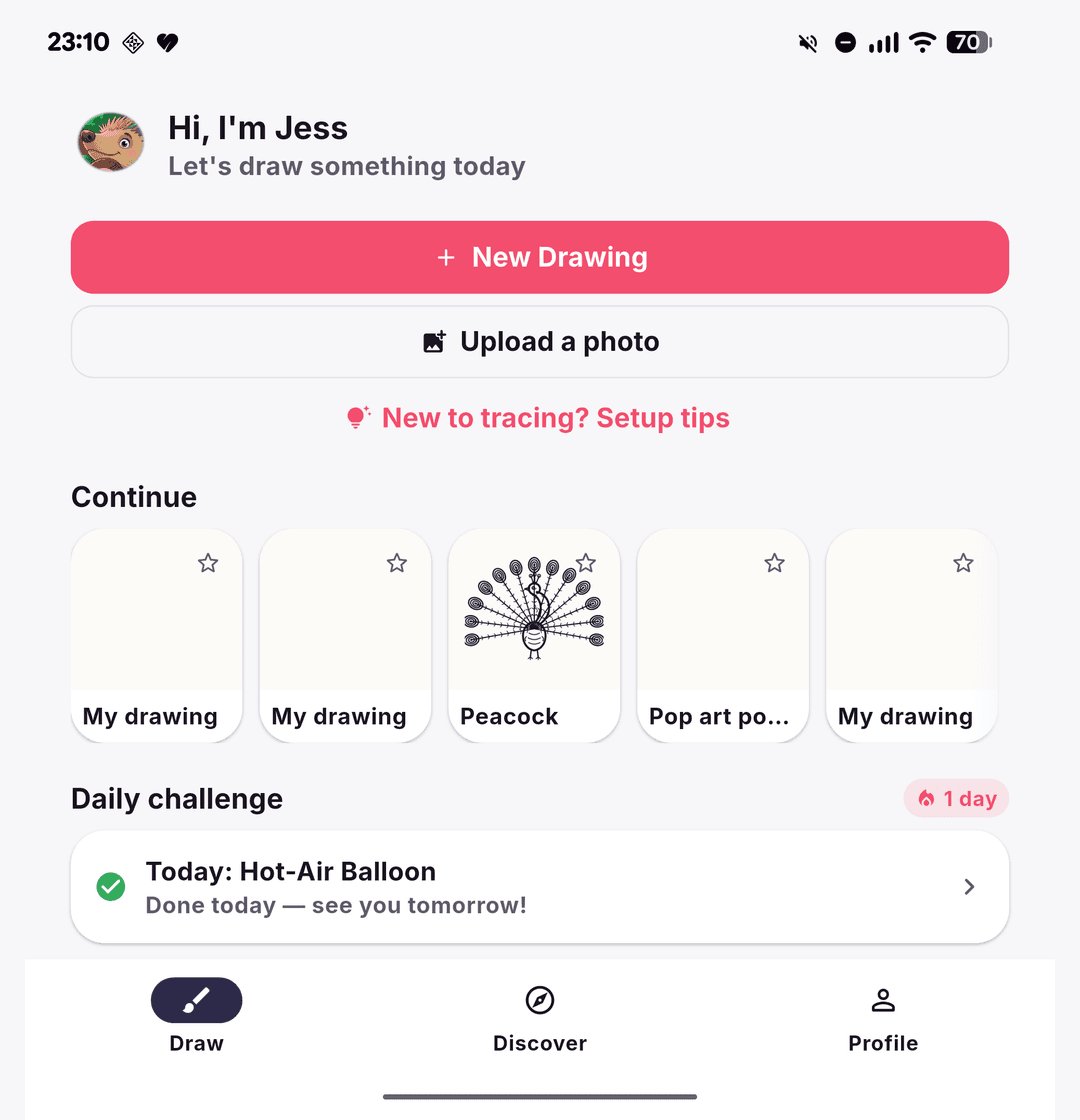
Draw — start a new picture, upload or snap a photo, pick up recent work, or open the live Mirror Doodle. Today's daily challenge is right there.
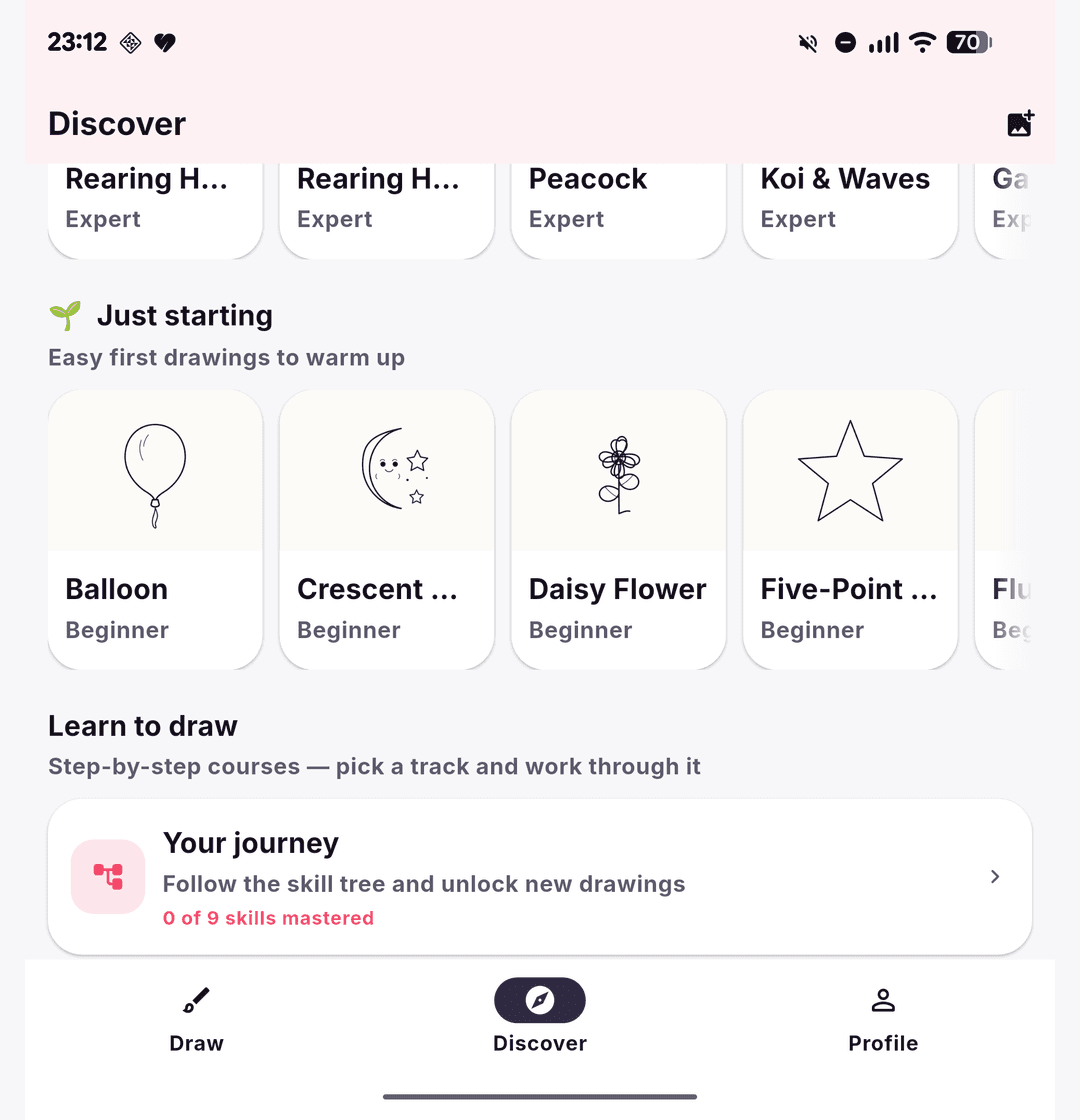
Discover — a rotating weekly theme, a beginner-friendly ‘Just starting’ shelf, step-by-step course tracks and a ‘Your journey’ skill tree, over a big searchable template library.
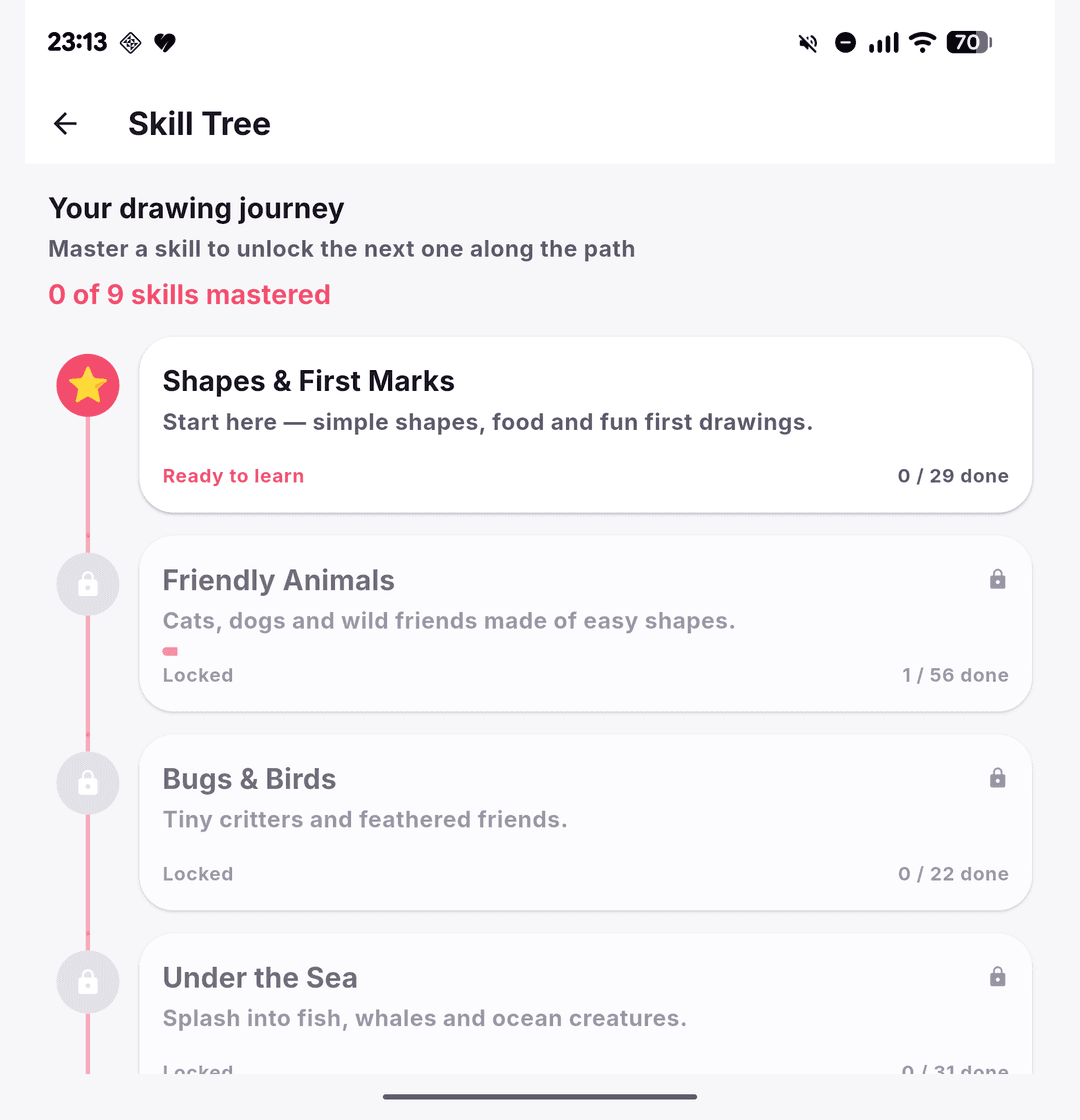
Skill Tree — the 250 lessons mapped onto a visual journey; master a node (Shapes → Animals → Bugs & Birds → Under the Sea…) to unlock the next.
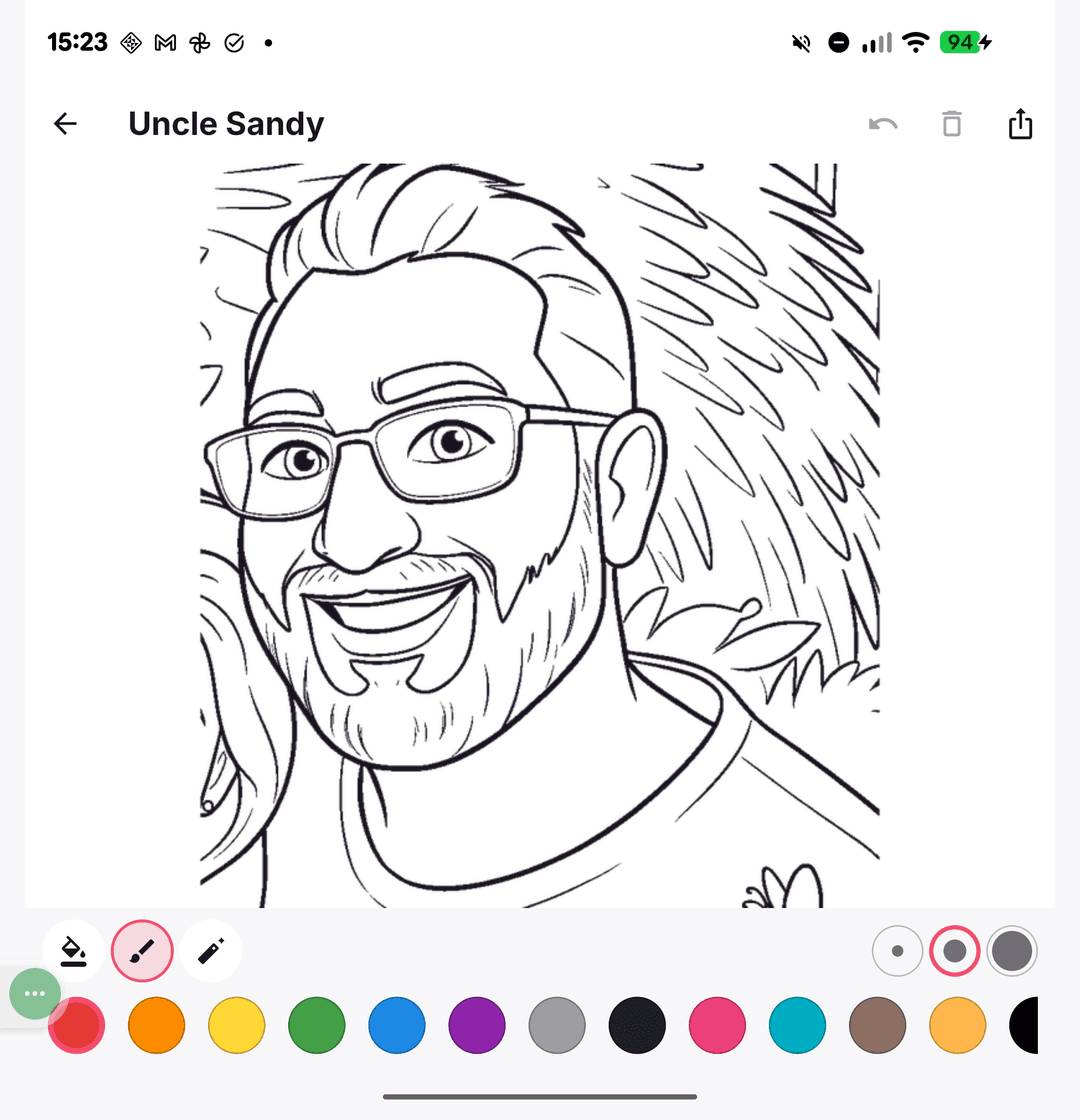
Colour-in — a true flood-fill, brushes and a full palette over the outline, with a selected-colour ring and Save / Print / Share on every finished piece.
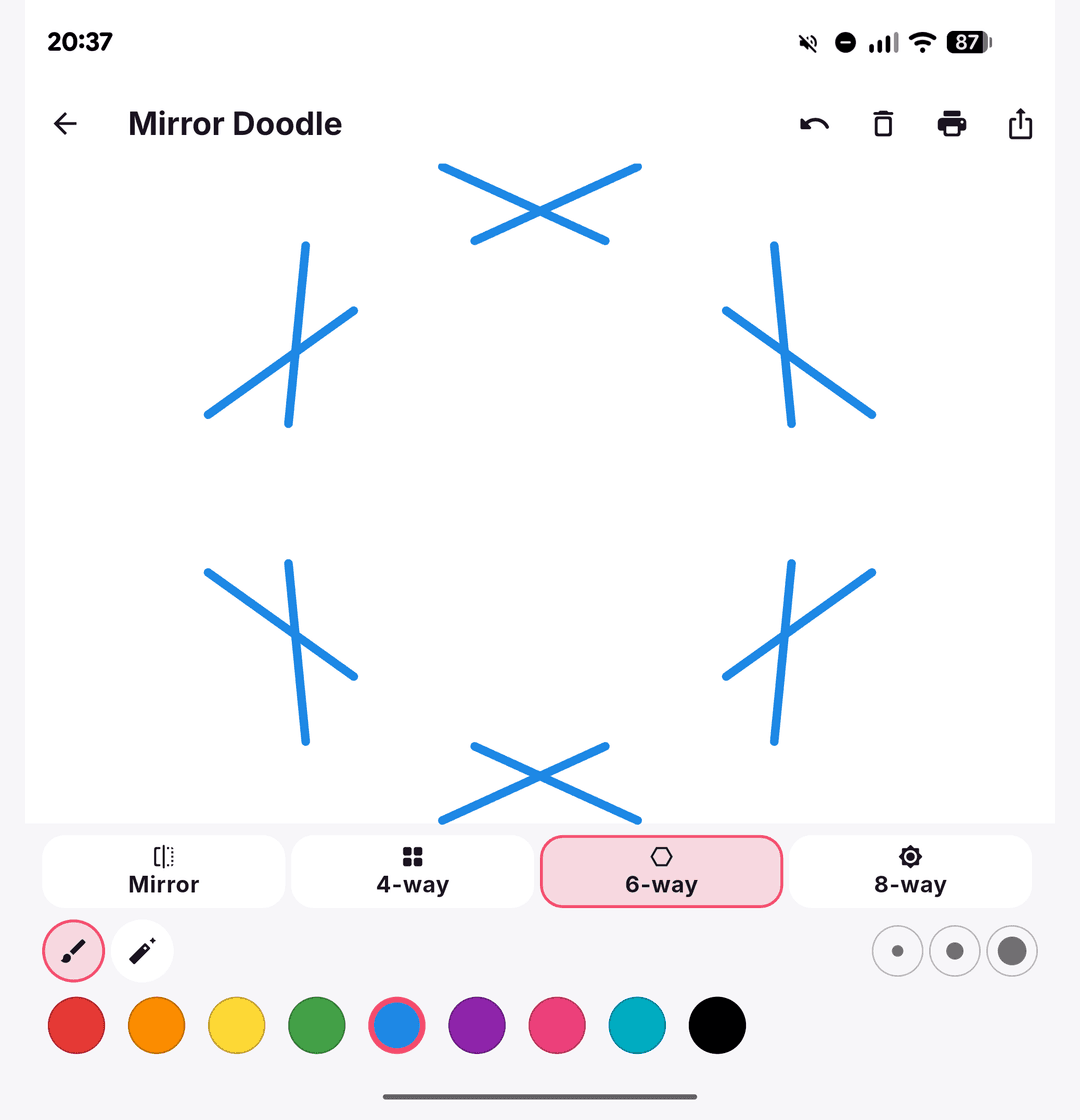
Mirror Doodle — every stroke mirrors live across a 2-, 4-, 6- or 8-way axis, turning a scribble into instant kaleidoscope art.
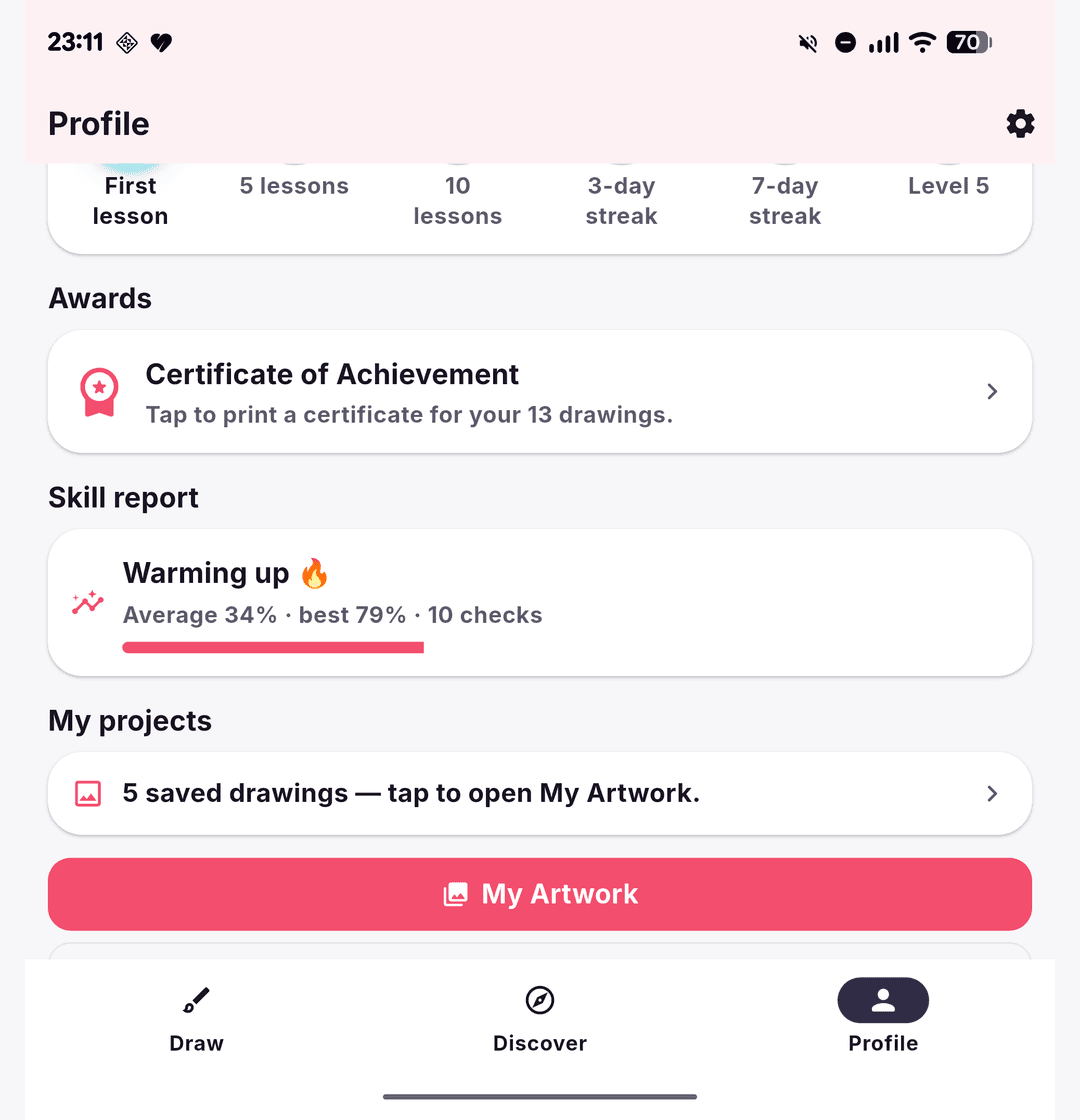
Profile — badges, an Awards certificate, a self-check skill report and ‘My projects’, with 250-lesson progress across multiple child profiles, all on-device.
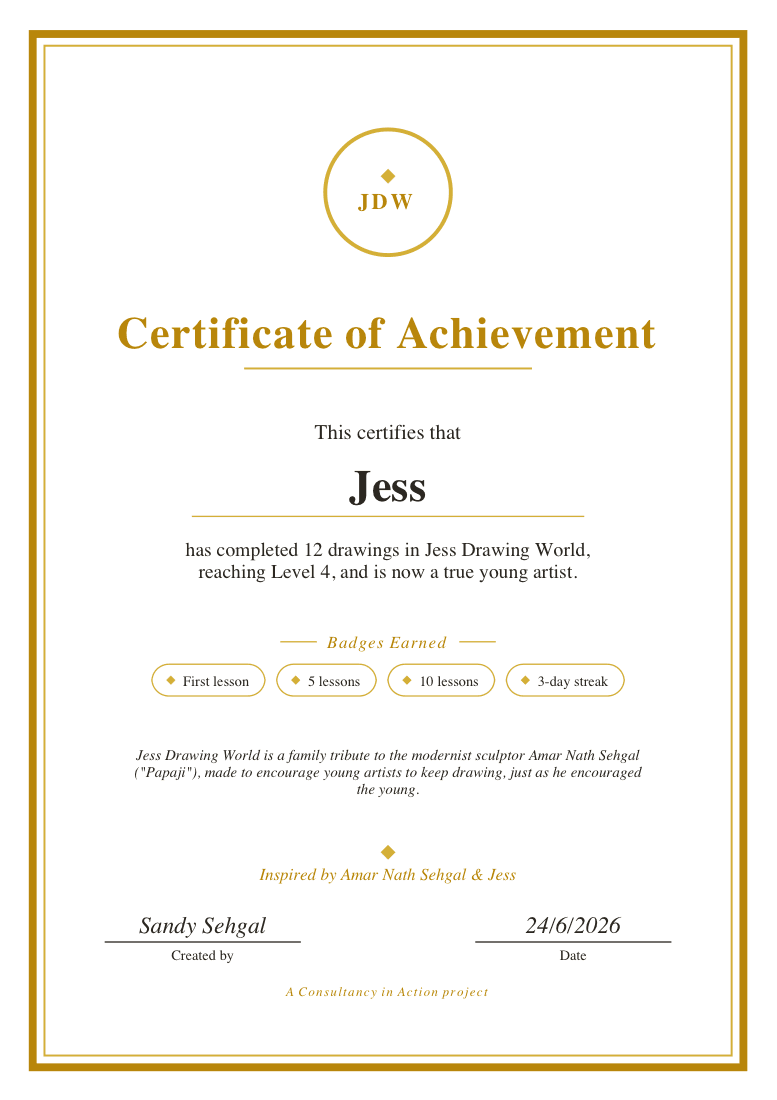
Achievement certificate — a formal, printable A4 diploma with the child's name, level and earned badges; created by Sandy Sehgal and dedicated to the sculptor Amar Nath Sehgal (‘Papaji’) and Jess.
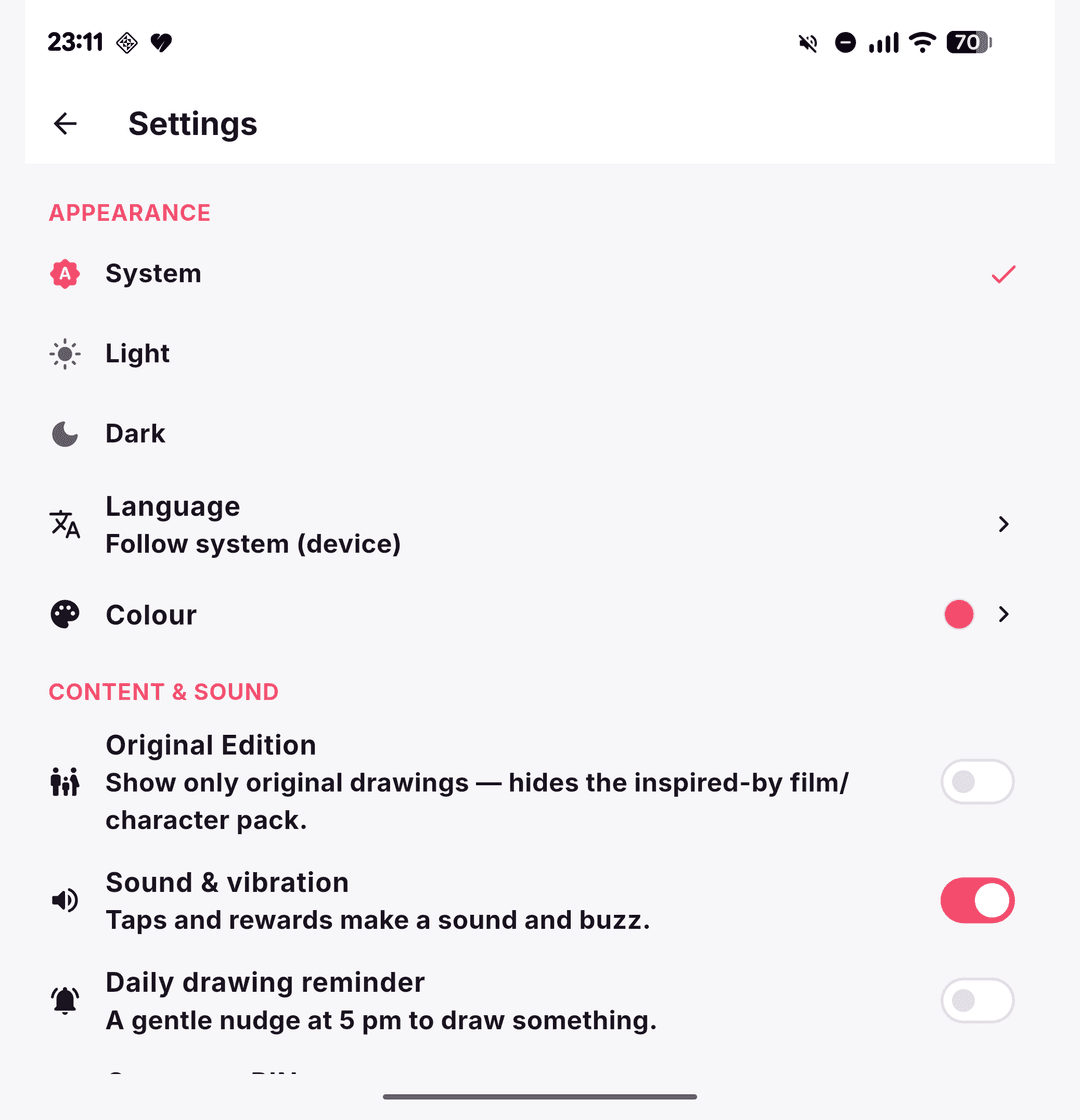
Settings — light/dark, an in-app Language picker and an accent-Colour choice, Original Edition toggle, reminders, a grown-up PIN and an honest on-device data note.
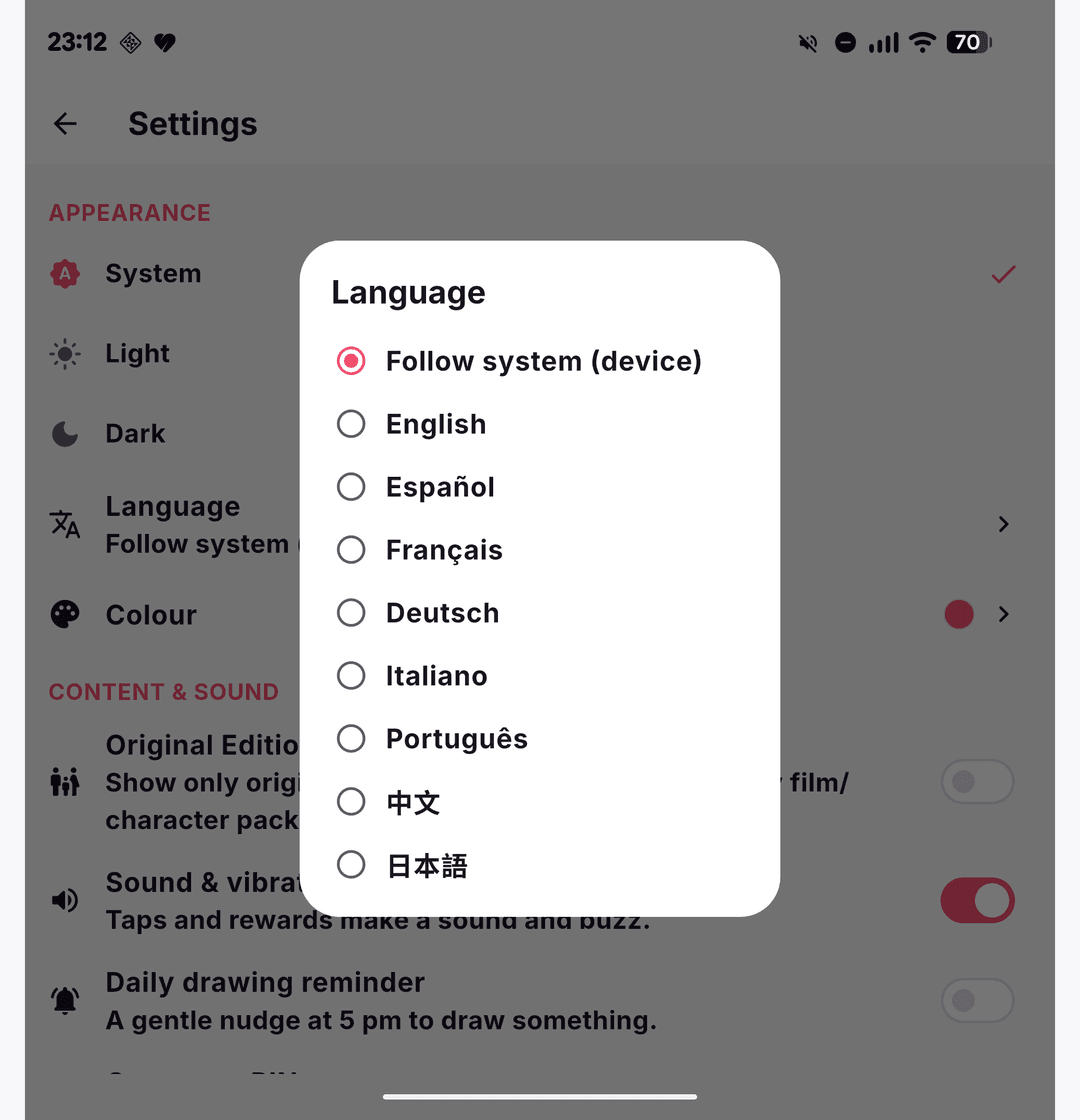
Language — switch the whole app live between English, Español, Français, Deutsch, Italiano, Português, 中文 and 日本語, or follow the device.
The safeguards, in plain English
What it actually does to keep your code and data safe — without the jargon.
Everything runs on the device
The image processing, accuracy scoring, read-aloud and reminders all run locally on the phone. Nothing your child draws or photographs is sent anywhere.
No account and no ads
There's nothing to sign up for and no advertising. Your child can't be tracked, profiled or shown things you didn't choose.
Nothing is uploaded to the cloud
There is no cloud backend and no analytics service. By design, the app has nowhere to send your child's data.
Data is encrypted on the device
Progress and artwork live in an encrypted database (SQLCipher) whose key is held in the phone's secure Keychain/Keystore, namespaced per child.
A grown-up PIN guards the settings
Parent and settings areas sit behind a PIN, so a child stays in the safe drawing parts of the app.
How this compares
Indicative — the same scope, delivered three different ways.
| Delivery route | Cost | Time |
|---|---|---|
| UK digital agency | £60,000–£120,000+ | 4–6 months |
| Solo freelance developer | £25,000–£45,000 | 3–5 months |
| CIA — AI-accelerated with Claude Code | From a small fraction of agency cost | Weeks, not months |
How it compares to the market
Capability against the closest competitors. Distribution, install base and store ratings are deliberately excluded — this is a pre-release build, so the comparison is scoped to what each app can do, not how many people have it yet.
| Capability | Jess Drawing World | SketchAR | Da Vinci Eye | AR Drawing: Sketch & Paint | Drawing Desk | ArtWorkout |
|---|---|---|---|---|---|---|
| Availability | Sideloaded APK — not store-published (pre-release v0.1.0+1) | Published app-store app | Published app-store app | Published app-store app | Published app-store app | Published app-store app |
| Markerless anchored-AR tracing onto real paper | Yes — native ARCore + GLES2, locks image to paper | Yes — projects sketch onto paper/walls (advertised) | Partial — camera-lucida overlay, needs phone-on-glass rig (advertised) | Yes — AR projection of outlines onto paper (advertised) | No — on-screen drawing only | No — on-screen tracing only |
| Classic camera-overlay tracing + stabilisation | Yes — live overlay, filters, gyro de-shake, strobe | Yes — live AR overlay (advertised) | Yes — overlay with strobe (advertised) | Yes — projected outlines (advertised) | No | No |
| Step-by-step guided lessons | Yes — 250 lessons / ~1,000 steps, themed tracks + a skill tree | Yes — ~1000+ lessons (advertised) | No — pure tracing tool (as-advertised) | Partial — some drawing lessons (advertised) | Yes — ~1000+ guided lessons (advertised) | Yes — ~3500+ interactive lessons (advertised) |
| Tracing template library (count) | ~285 original + ~1,040 inspired-by (toggle-hidden) | ~1000+ sketches (advertised) | Bring-your-own image (no fixed count) | Built-in templates (animals, cars, etc.; advertised) | ~500+ stickers / lesson art (advertised) | Lesson-based (no standalone library) |
| On-device photo to line-art (no cloud) | Yes — adaptive-threshold CV + Pop-art, fully on-device | Partial — AI features, cloud-assisted (advertised) | Partial — posterize/breakdown, on-device (advertised) | Partial — AI photo-to-sketch, Pro-locked (advertised) | No | No |
| Interactive colour-in (real flood-fill) | Yes — true flood-fill, outline-stop, undo history | No — digital canvas brushes only (advertised) | No | Yes — coloring pages (advertised) | Partial — paint tools, no true flood-fill (advertised) | No |
| Self-check accuracy score (local CV) | Yes — on-device CV self-check, no cloud | Partial — AI learning plan (advertised) | No (as-advertised) | No | No | Yes — real-time stroke analysis, on-screen (advertised) |
| Fully offline / no-cloud architecture | Yes — all CV/TTS/notifications/storage on-device | No — cloud-backed AI / accounts (advertised) | No — cloud features/account (advertised) | No — cloud AI, account (advertised) | No — cloud sync / accounts (advertised) | No — cloud + community (advertised) |
| No ads, no subscription, no account required | Yes — no ads, no account, no IAP | No — freemium, subscription upsell (advertised) | No — subscription for full access (advertised) | No — weekly subscription (advertised) | No — freemium subscription (advertised) | No — freemium subscription (advertised) |
| Kids/parent safety (PIN gate + parent dashboard) | Yes — grown-up PIN lock + 2-week activity dashboard, multi-child | No (advertised) | No (advertised) | No (advertised) | Partial — Kids Desk mode, no PIN/dashboard (advertised) | No (advertised) |
| Encrypted local-first data storage | Yes — SQLCipher DB, key in OS Keychain/Keystore | No — cloud accounts (advertised) | No (advertised) | No (advertised) | No (advertised) | No (advertised) |
| Read-aloud (on-device TTS) for pre-readers | Yes — flutter_tts per lesson step | No (advertised) | No (advertised) | No (advertised) | Partial — voice instructions in lessons (advertised) | No (advertised) |
| Print-to-colouring-page PDF + time-lapse capture | Yes — A4 line-art PDF + GIF time-lapse | Partial — time-lapse recording, no PDF print (advertised) | Partial — process recording (advertised) | Partial — video recording, no PDF (advertised) | No | No |
| Price | Free — not store-distributed (sideloaded APK) | ~$14.99/mo, ~$34.99–69.99/yr (advertised) | ~$7.99/mo or ~$29.99/yr (advertised) | ~$10/wk (~$40/mo equiv; advertised) | ~$7.99/mo (advertised) | ~$7.99/mo+ (advertised) |
Method & what's excluded
Category framing: this is an AR-trace + learn-to-draw-for-kids comparison, so rows emphasise the capabilities that distinguish that niche (anchored-AR vs on-screen tracing, on-device CV, kid/parent safety, offline/privacy, price model). An Availability row is included so the matrix itself surfaces that Jess Drawing World (JDW) is a sideloaded pre-release personal build (v0.1.0+1), while every competitor is a published app-store product — this keeps the comparison honest even though it is scoped to capability rather than market reach. Column choice: kept JDW plus the 5 most directly comparable competitors — the three core AR-tracing apps (SketchAR, Da Vinci Eye, AR Drawing) and the two strongest lessons/kids players (Drawing Desk, ArtWorkout). Values for JDW are taken from the verified inventory (e.g. ~285 original templates plus ~1,040 inspired-by ones hidden behind an Original Edition toggle, 250 lessons / ~1,000 LessonStep entries grouped into a skill tree, SQLCipher + Keychain, flood-fill colour-in, adaptive-threshold line-art, PIN + 2-week dashboard, 8 in-app languages, no ads/account). Competitor values are taken from supplied third-party research (collected mid-2026), NOT independently verified here, and are labelled 'advertised' or 'as-advertised'; counts and prices are prefixed with '~' because they are approximate and subject to change. 'Partial' marks a weaker or different version of a feature (e.g. Da Vinci Eye's camera-lucida overlay needs a phone-on-glass rig, so it is markerless-AR Partial; ArtWorkout has real-time stroke analysis but only on-screen, so its self-check is Yes while its AR is No). Where a rival genuinely beats JDW it is shown honestly: SketchAR/Drawing Desk/ArtWorkout offer far larger advertised lesson catalogs (~1000–3500+ vs 250), and ArtWorkout's stroke-analysis scoring is mature. The matrix compares capability, not market penetration; distribution, install base, store ratings and download counts are excluded (see excluded list) because JDW is not store-distributed, so a reach comparison would be misleading — the Availability row preserves that context without scoring it.
- distribution / app-store availability / install base (downloads, ratings count, store presence) — excluded as scored rows because Jess Drawing World is not yet published to any app store (current distribution is sideloaded LAN APKs at v0.1.0+1; TestFlight/Play Internal Testing are future goals), so any reach/popularity comparison would unfairly penalise an unshipped build. The matrix is scoped to capability, not market reach; an Availability row is included so the unshipped status is visible without being scored.
- Adobe Fresco — excluded as a column: it is a high-end professional raster/vector painting app with no AR/camera tracing and is not aimed at kids, making it a poor like-for-like comparison in this category.
- Tracing Projector — excluded as a column: iOS-only, tracing-only with no lessons or skill progression; narrower and less comparable than the three AR-trace apps retained.
- Kids Doodle — excluded as a column: very basic toddler doodle/colour app whose tracing and AR are rudimentary; the retained kids-oriented apps (Drawing Desk) represent the category's stronger players.
Competitor values are drawn from third-party research (mid-2026) and are labelled “advertised”; they are not independently verified. “~” marks approximate counts or prices.
By the numbers
What was delivered — verified facts from the build, not projected returns.
Built with
- Flutter (sdk >=3.4.0, flutter >=3.22.0; CI pinned 3.44.2)
- Dart
- Riverpod 2.x with riverpod_generator/riverpod_annotation
- go_router 14.x
- Drift 2.20 over sqlite3, encrypted at rest with SQLCipher (sqlcipher_flutter_libs)
- flutter_secure_storage (Keychain/Keystore DB key)
- camera 0.11 + permission_handler
- sensors_plus (gyro de-shake stabilisation)
- image 4.2 (pure-Dart decode/encode, GIF) + custom adaptive-threshold line-art CV
- pdf 3.11 + printing 5.13
- flutter_tts (on-device read-aloud)
- flutter_local_notifications + timezone
- flutter_localizations + intl + gen-l10n (8 locales: en/es/fr/de/it/pt/zh/ja)
- speech_to_text (on-device voice search), image_picker, share_plus
- Native Android Kotlin: raw ARCore + GLES2 PlatformView (custom renderer)
- build_runner, drift_dev, alchemist golden tests, custom_lint/riverpod_lint/flutter_lints, flutter_launcher_icons
- GitHub Actions CI (subosito/flutter-action; analyze + test)
Independent product review
An honest assessment of the build — strengths and weaknesses both.
An unusually deep, genuinely private kids' drawing app whose engineering punches far above its pre-release version number — held back only by the fact that nobody outside one Pixel can easily install it yet.
What's strong
- Truly local-first and private by construction: no accounts, ads, analytics, or cloud upload, with user data in an encrypted SQLCipher database whose key lives in the OS Keychain/Keystore — a rare and credible privacy posture for a children's app
- Remarkable feature depth for a personal build: 250 guided lessons (~1,000 steps) on a skill tree, ~285 original tracing templates (incl. a Sehgal tribute), colour-in with a real flood-fill, live mirror/kaleidoscope doodle, on-device photo-to-line-art, gamification, parent dashboard, an achievement certificate, TTS read-aloud, 8 languages and printable PDFs
- Serious, non-trivial engineering: a hand-written native ARCore + GLES2 PlatformView in Kotlin (not an off-the-shelf plugin) that locks a reference image onto real paper, plus pure-Dart adaptive-threshold line-art CV
- All AI/CV, scoring, TTS and reminders run fully on-device — nothing phones home, and notifications work with no push server
- Thoughtful kid/parent UX: grown-up PIN lock, multi-child profiles, first-run onboarding, accessibility (Semantics, system text-scale, tap targets), sound/haptics and a weekly challenge shelf
- Sound technical hygiene: Riverpod code-gen + go_router architecture documented in ARCHITECTURE.md, deterministic alchemist golden tests with a pinned font, ~103 test cases across 33 files, and CI on a pinned Flutter 3.44.2
Where it's held back
- Not on any app store — distribution is currently sideloaded APKs over LAN; TestFlight and Play Internal Testing are aspirational (TASKS.md), so a non-technical parent cannot realistically install it
- The flagship markerless anchored-AR is Android-only and ARCore-dependent: no ARKit/iOS path exists, and like all ARCore tracking it needs textured, well-lit surfaces to lock reliably
- iOS is configured but unverified-shipped, and the web build cannot do the headline camera/AR/photo-capture features — those are mobile-only in practice, so 'three platforms' overstates real coverage
- Spanish is scaffolding, not a finished locale: the .arb files hold only ~16 translatable strings each, so most of the UI is not actually translated despite the i18n plumbing being present
- Single-child origin (built for 'Jess'): content, defaults and testing reflect one real user, and broad-age or classroom readiness is unproven
- CI runs only analyze + test on Ubuntu — no build, golden-on-runner, format-check or CD job is wired in yet, so release confidence rests partly on local runs
Jess Drawing World is the rare hobby project that doesn't read like one. Under the hood it is a properly architected Flutter app — Riverpod code-gen, go_router, a Drift/SQLCipher database opened on a background isolate with its key in the OS keystore — wrapped around a feature set (lessons, 1,040 templates, flood-fill colour-in, on-device line-art, gamification, parent dashboard) that many shipping commercial kids' apps don't match. The standout is the AR: rather than reaching for a plugin, the author wrote a raw ARCore + GLES2 PlatformView renderer in Kotlin to pin a reference drawing onto physical paper. That is a hard thing to do well, and it's the clearest signal that this build is ambitious rather than throwaway.
The privacy story is the other genuine differentiator and, for the target audience, the main reason to care. There is no account, no ad SDK, no analytics backend, and no cloud upload; the AI features, text-to-speech, scoring and reminders all run on the device, and data sits in an encrypted database behind a parent PIN. In a category where 'free' usually means a child's behaviour is the product, a local-first, offline-by-default design is a meaningful, verifiable stance — and the code backs up the claim.
The weaknesses are mostly about reach and finish rather than substance. At version 0.1.0+1 the app isn't on any store; it's sideloaded APKs over the local network, which immediately rules out most of the parents who'd value the privacy model. The headline AR is Android-only and inherits ARCore's need for textured surfaces and decent light; iOS is configured but unverified and the web build can't actually use the camera or AR. The Spanish locale is plumbed but barely populated (roughly sixteen translatable strings), and CI only runs analyze-and-test on Ubuntu with no build or release pipeline. These are normal gaps for a pre-release personal project, but they're real and a buyer should know them.
Net assessment: this earns a strong 8/10 as what it is — a deep, well-engineered, privacy-first personal build. It is not yet a product a stranger can download and trust to update, and the single-child origin means breadth across ages and devices is unproven. Close the distribution gap (a signed store listing), bring iOS to parity or scope the marketing to Android, and finish the Spanish strings, and this would be straightforwardly recommendable to a much wider audience.
Best for: Privacy-conscious, technically capable parents who can sideload an APK onto a modern Android phone or tablet and want a genuinely offline, no-account, no-ads drawing and tracing companion for a young child — especially one who'll use the camera-overlay or AR tracing on real paper.
Want something built like this?
We design and ship real, data-driven products — not demos. Tell us what you're trying to make and we'll talk through fit.